Bellsoph for UK landlords

AI property management software for UK landlords

Less admin. More time. You stay in control.

Spend less time managing your properties. Bellsoph brings AI-powered tools for rent, compliance, maintenance and expenses into one place, helping you stay on top of your portfolio without the endless admin.

WhatsApp AI agentComing soon
Bank connectionsComing soon
Jump to the property workflow walkthrough on this page.
Coming soon

Your property assistant. A conversation away.

The planned WhatsApp AI agent will bring your portfolio questions and suggested next steps into one conversation, using the property records behind the answer.

  • Ask about rent, certificates and outstanding work
  • Check the linked records and source evidence
  • Review proposed changes and messages before approval

Coming soon. For now, manage your properties and follow-ups in the Bellsoph workspace.

WhatsApp AI agentIllustrative conversation
Coming soon

What needs my attention this week?

Your saved records show a repair task due this week and a certificate renewal to review.

Suggested next step: open the linked tasks and check the evidence before acting.

Which certificates expire next month?

I would check the expiry dates saved in your compliance records and show the matching certificates.

Missing or incorrect dates need your review against the original documents.

Illustrative answers using fictional records. Coming soon; this is not a live chat.

In your workspace today

Less chasing. A clear next step.

Keep the record, the evidence and the follow-up together. These workflows are available in Bellsoph now.

A certificate becomes a follow-up

  1. Upload a certificate
  2. Review details and flagged issues
  3. Link a follow-up task

Check the AI suggestions against the original, save the certificate to the right property and track any work needed with a linked task.

Explore the workflow

A repair stays connected to the work

  1. Record the repair
  2. Create a property-linked task
  3. Track progress to completion

Give the repair a due date and a place in your task list. Keep updates with the property and record completion when the work is done.

Explore the workflow

Recorded rent gives you a clearer balance

  1. Record a received payment
  2. Review the remaining balance
  3. See it in your reports

Record payments against the relevant invoice or tenancy. Balances and reports reflect your saved entries, so check and correct them when needed.

Explore the workflow
Coming soon

Bank-connected tracking. With your review.

Planned bank connections will help bring transactions into your rent and expense workflow, with suggested matches for you to check.

You will review the transaction, property and amount before confirming a match. A suggested match will not mean rent is automatically recorded as paid.

  1. 1
    Bring in bank transactions

    Coming soon: connect your bank to support tracking.

  2. 2
    Review suggested matches

    Check the transaction against your rent or expense records.

  3. 3
    Confirm what is recorded

    Keep control of payments and the balances you rely on.

One workspace for every property.

Bellsoph brings everything together in one place so you can save time, stay on top of compliance and keep your portfolio performing.

  • All properties, tenants and tenancies connected
  • Maintenance, compliance and documents in one place
  • Rent, invoices, expenses and reports organised
  • Calendar, tasks and reminders built around each property
  • AI extracts document details for your review
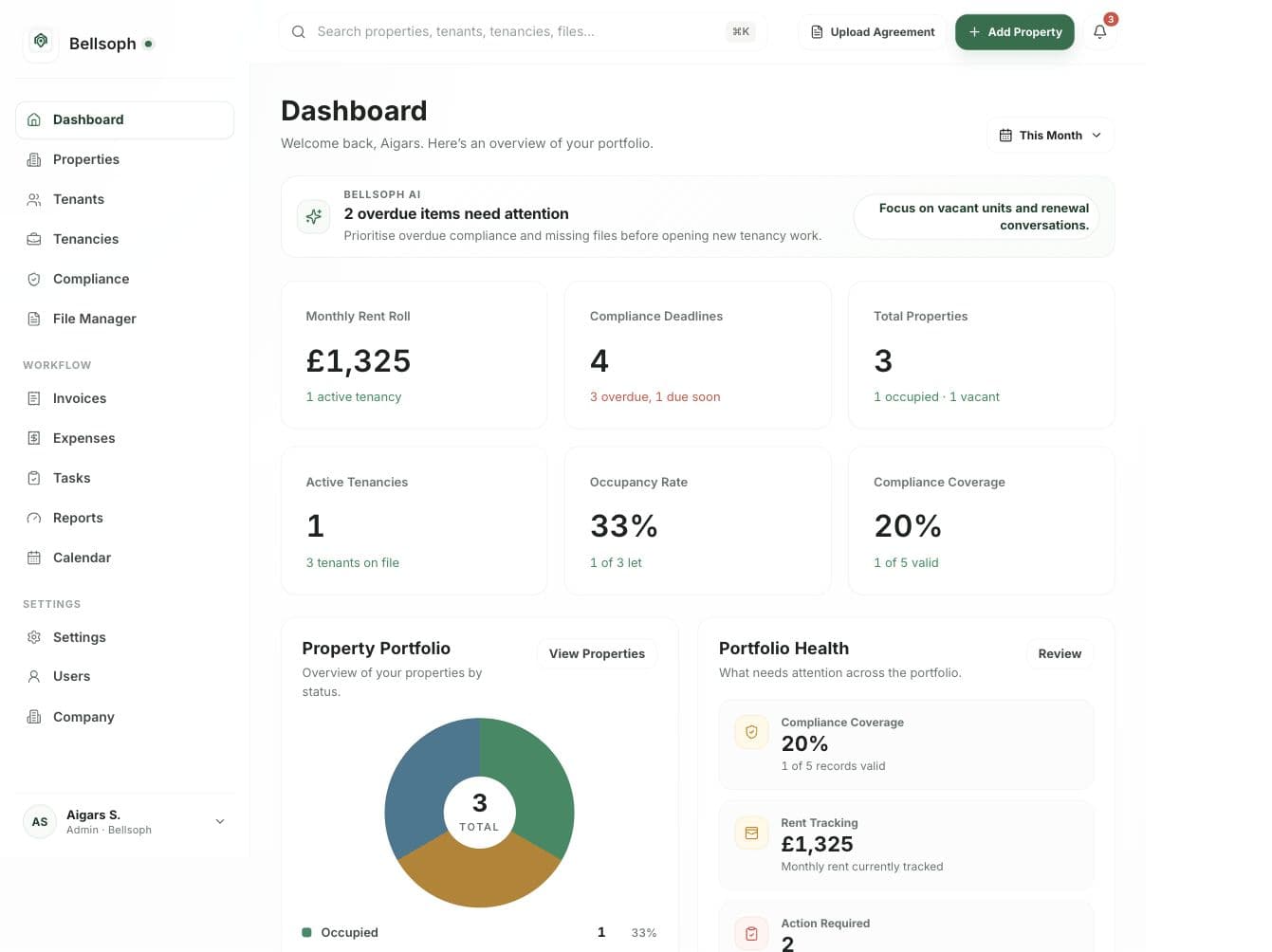
Bellsoph property management dashboard showing rent, compliance, tasks and portfolio health

From document to details you can check.

Upload a tenancy agreement, compliance certificate or expense receipt. AI helps extract the details; you check them against the original, correct mistakes and confirm what is saved.

AI reads compliance certificates, extracts key details and highlights issues recorded in the document, such as unsatisfactory EICR results or gas safety warnings. You review the findings before saving.

Keep source documents linked to your property records. Review the evidence, decide what is saved and use activity history to trace changes.

Tenancy document review
Upload an agreementRead the suggested fieldsCheck and correctConfirm the records
Details to check against the original
  • Property address and tenant names
  • Rent amount and payment frequency
  • Tenancy dates and deposit details
  • Missing or uncertain information

Illustrative workflow. You review the extracted details before creating records.

Everything you need, in one place.

Built to keep maintenance, compliance, rent, files, expenses and reports working together.

WhatsApp AI agent

Coming soon

Planned: message your agent for portfolio answers, compliance entries and maintenance updates. Review suggested tenant and contractor messages, record changes and follow-up actions before approving them.

AI document extraction

Turn agreements, certificates and receipts into suggested details. Check the original, correct anything that needs changing and approve the records.

Maintenance follow-ups

Record tasks, set due dates and link work to a property or tenancy.

AI compliance document checks

AI reads certificates and flags reported issues for your review. Track expiry dates and follow-ups.

Rent & invoices

Create rent invoices and record payments when they clear.

Expenses and tax records

Upload receipts, extract details and prepare reports.

Calendar & tasks

Keep important dates and follow-ups visible.

File & document management

Store, organise and find property documents quickly.

Reports & portfolio health

Understand performance, cashflow and risks at a glance.

Audit & activity history

See actions, changes and communications in one place.

How tenancy document import works.

Start with the agreement you already have, then check the extracted details before creating your records.

  1. 1Upload your agreement

    Choose a tenancy agreement as a PDF, Word document or supported image.

  2. 2Extract the details

    AI reads the document to suggest property, tenant and tenancy details.

  3. 3Review and correct

    Check the extracted details against your agreement and choose the right property.

  4. 4Confirm the records

    Create or link the property, tenant and tenancy records after your review.

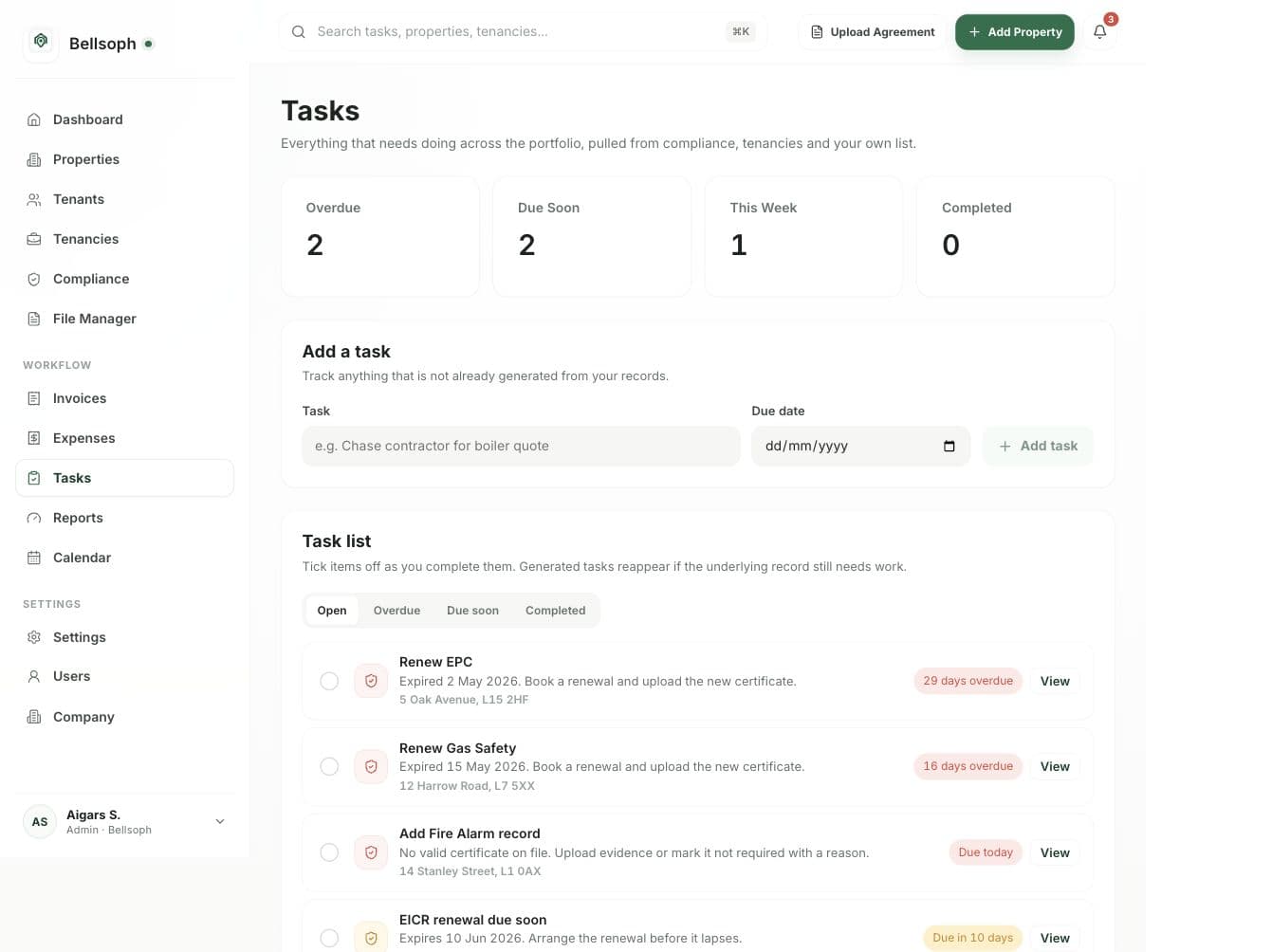
Bellsoph tasks page showing open maintenance and compliance work
Tasks stay linked to records.Compliance, maintenance and follow-ups are captured in one place.
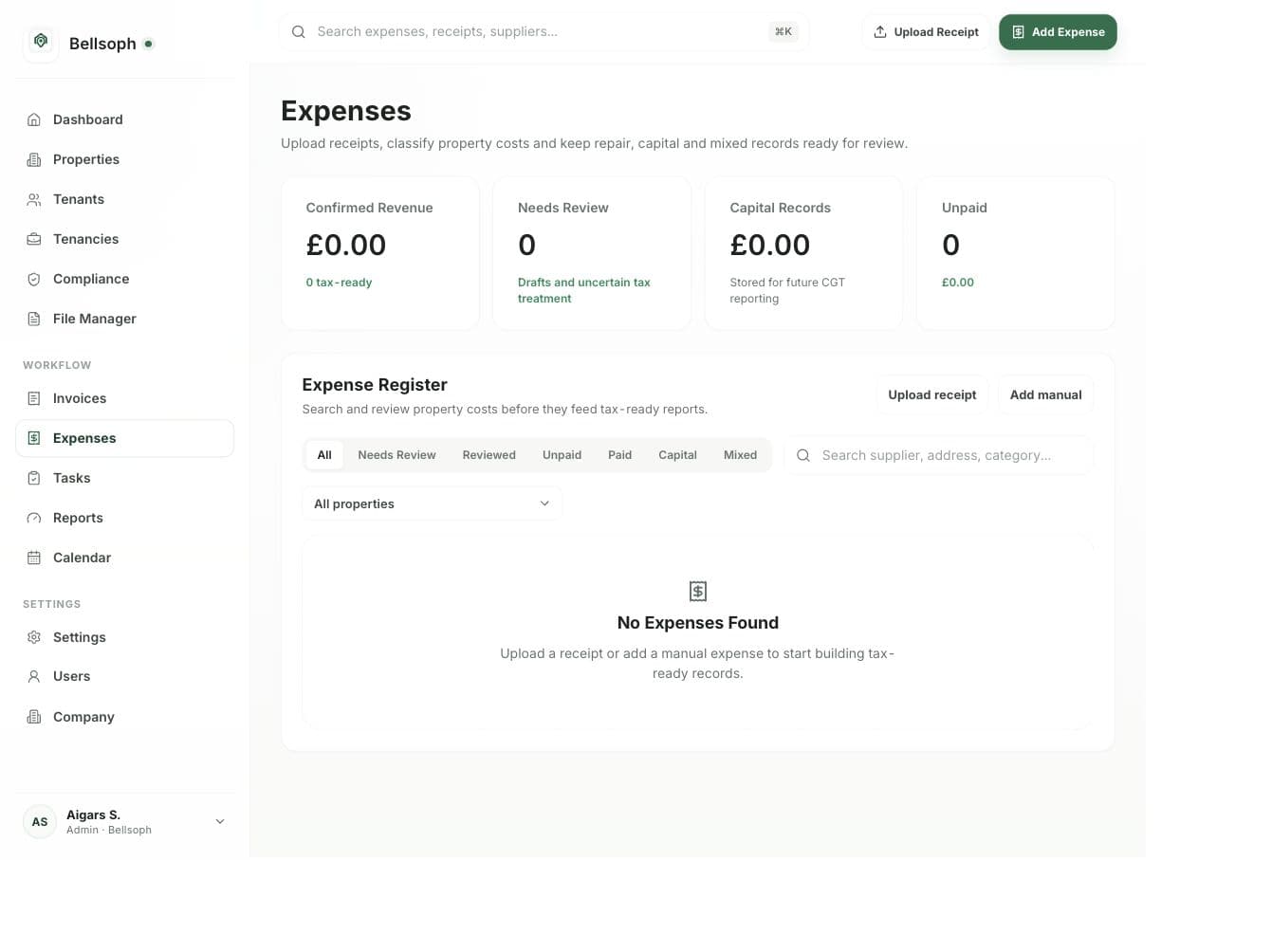
Bellsoph expenses page showing receipt and invoice record keeping
Expenses stay organised for review.Upload receipts, extract details and prepare property records.

Designed around the way UK landlords actually work.

  • Compliance visibility
  • Connected property records
  • Review-based AI decisions
  • Clear owner approval controls
  • Audit history & data security
Free to get started. A 30-day free trial of Pro.

Start free. Grow with Pro.

The same core tools in both plans, including AI compliance document checks. Choose the property allowance that fits your portfolio.

For your first property

Bellsoph Free

£0 / forever

1 property included

The same core tools as Pro, for one property. No time limit.

Get started free

No card required

  • Property, tenant and tenancy records
  • AI-assisted document extraction with your review
  • AI compliance document checks and issue flags
  • Rent invoices and payment recording
  • Expenses, reports, tasks and document storage
30-day free trial

Bellsoph Pro

£19.99 / month

Up to 8 properties included

£2.50 per month for each additional property.

Start your 30-day Pro trial

No payment at signup

  • Property, tenant and tenancy records
  • AI-assisted document extraction with your review
  • AI compliance document checks and issue flags
  • Rent invoices and payment recording
  • Expenses, reports, tasks and document storage

Free covers one property with no time limit. Pro includes a 30-day free trial for all users.

No payment is taken when you create your trial account. We will confirm your subscription and billing details before your first payment.

Public property data, calculators and landlord guides remain free to use without an account.

Research before you act

Property decisions start with evidence.

Bellsoph connects the software used to run a portfolio with free UK market intelligence used to assess it. Move from official evidence to practical calculations and day-to-day operations without losing the source trail.

Official sources include UK HPI, HM Land Registry and ONS, with source periods shown on the page.

Practical guides for the work behind your records.

Use these free guides alongside your portfolio workspace, from organising documents to planning repairs.

Common questions

Clear answers before you start.

See what Bellsoph covers, how the AI is used and where the public market evidence comes from.

Who is Bellsoph built for?

Bellsoph is built for UK landlords and property teams that want one place for portfolio records, tenancies, maintenance, compliance, rent, expenses, files and follow-up work.

What does the AI actually do?

AI extracts details from tenancy agreements, compliance certificates and expense receipts. It can also highlight issues recorded in compliance documents, such as unsatisfactory EICR results and gas safety warnings. You check the suggested details and issues against the original, correct anything missing or wrong, and confirm before saving.

How are rent payments tracked?

Create rent invoices and record payments received against the relevant tenancy. You confirm when a payment has cleared; the recorded status depends on the information you enter. Bank-connected tracking is coming soon: planned transaction matches will need your review before a payment is recorded.

Does compliance tracking replace professional advice?

Bellsoph helps organise saved certificates, expiry dates and follow-up tasks. You remain responsible for checking the rules that apply to your property and arranging the required work. Requirements vary across the UK and by local authority; use current official guidance or a qualified adviser when needed.

Can I use the property data without an account?

Yes. Bellsoph's public market data, calculators and Property Hub guides are free to explore without a platform account.

Where does the public market evidence come from?

Bellsoph uses official sources including the UK House Price Index, HM Land Registry and the Office for National Statistics. Data pages show the relevant source period and refresh date.

How will the WhatsApp AI agent help? Coming soon

Coming soon. The planned WhatsApp AI agent will help you ask portfolio questions and prepare compliance and maintenance follow-ups from connected records. You will review proposed changes and outgoing messages before approval. It is not available yet; today you can manage these records in the Bellsoph workspace.

Take control of your rental portfolio.

Manage maintenance, compliance, rent, expenses and everything in between from one intelligent workspace.

AI Property Management Software for UK Landlords | Bellsoph